
Text-based editing only transcribes words. Supacut builds your story structure directly in Premiere.
While other tools force you to read thousands of words just to hunt down clips yourself, Supacut's AI analyzes hooks, conflicts, and narrative arcs to deliver a fully structured rough cut straight to your timeline.
The Problem
Why traditional text-based editing slows down long-form documentaries and interviews
Tools like Descript or Riverside are fantastic for video podcasts or quick social media clips, but when you're facing 40+ hours of raw footage for a documentary or a deep brand-funded film, they become a massive bottleneck.
They understand words, not story structure
Searching by keyword only works if you already know what you're looking for. These platforms cannot detect a shift in narrative pacing, a subtle underlying conflict, or a cinematic hook buried inside 40+ hours of footage.
They force you to edit by reading, not watching
Spending hours chopping text in a web browser disconnects you from the visual context and destroys the natural flow of body language, subtext, and dramatic pauses that define documentary storytelling.
The XML transition to Premiere is broken
Exporting timelines from these platforms into Premiere Pro frequently breaks metadata, desyncs multi-cam audio, or leaves a chaotic sequence full of jump cuts that take days to clean up.
The Smart Alternative
Supacut thinks like a story editor, not a text processor
Supacut is not a glorified transcription tool. It's your co-editor in the room, processing transcripts linked to your original footage to handle the heavy analytical lifting: finding the actual narrative thread.
Our AI decodes the anatomy of a great script — mapping out hooks, inciting incidents, character conflicts, and resolutions. Instead of handing you a modified text file, it generates a comprehensive editorial blueprint and exports a real, timecode-accurate sequence directly into Adobe Premiere Pro, ready for you to craft the final cut.
- Detects narrative hooks automatically from raw transcripts
- Maps conflicts, character arcs, and story resolutions
- Exports a timecode-accurate sequence to Premiere Pro
- No XML fragility — native workflow integration
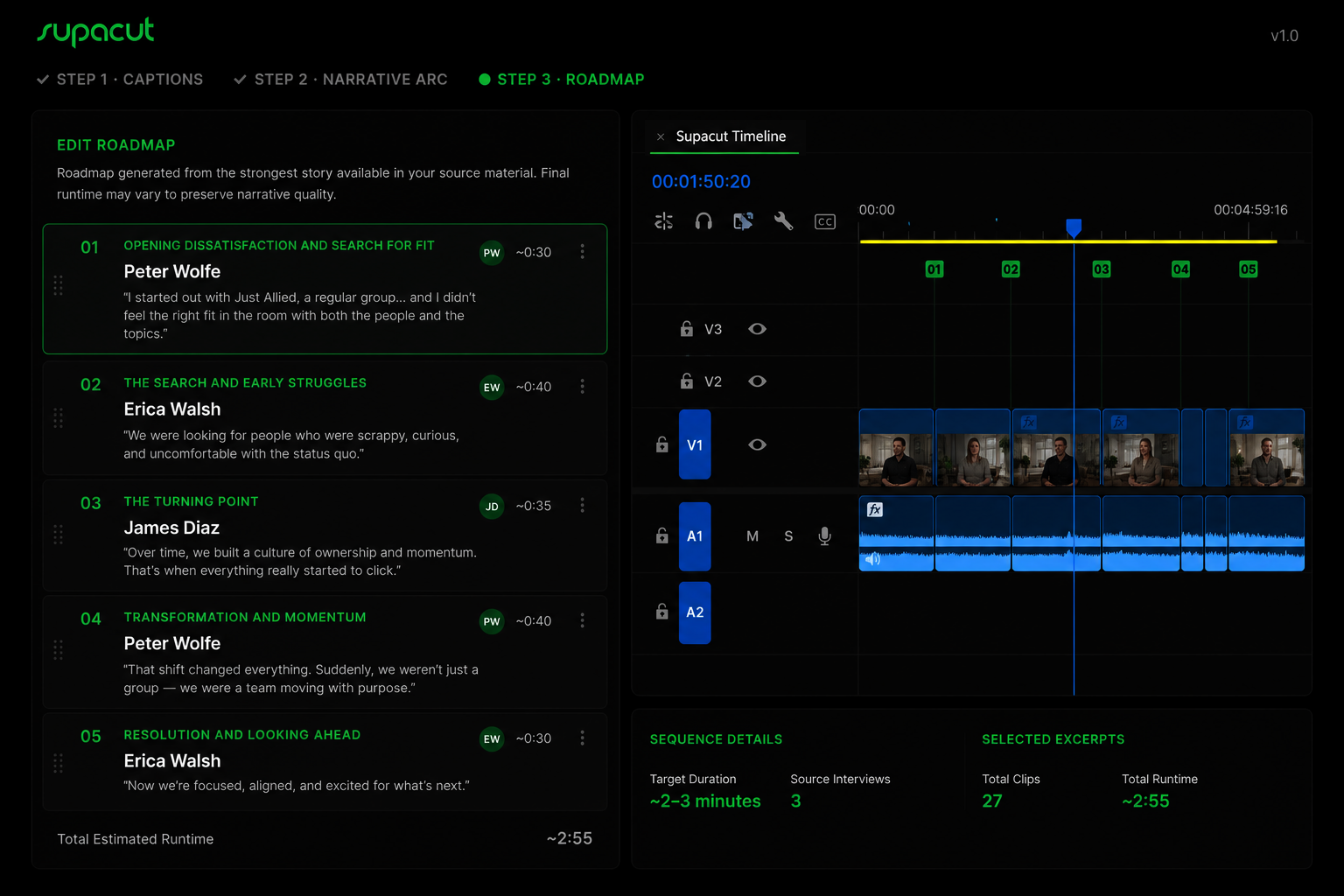
Supacut-generated Premiere Pro sequence — structured from raw interview transcripts
Feature by Feature
Workflow-driven comparison
| Criterion | Descript / Riverside | Best ChoiceSupacut |
|---|---|---|
| Core Focus | Rough-cutting video by editing flat text | Story discovery and structural editorial planning |
| Narrative Intelligence | None — recognizes words, removes filler phrases | High — detects hooks, conflicts, themes, and arcs |
| Final Deliverable | Exported video file or a loose XML of chopped text | Fully structured, block-organized Premiere sequence |
| Long-Form Suitability | Weak — detaches from cinematic context at scale | Built for docs, features, and long-form brand films |
| Premiere Integration | XML exports prone to relinking errors and media offline | Native and seamless — respects professional workflows |
Transformation
From a desert of text to a structured timeline in minutes
Before
- Three days highlighting PDFs and color-coding transcripts
- Dragging random clips into a blank timeline hoping a story emerges
- Broken XML exports from Descript with desynced audio
- No narrative structure — just a pile of soundbites
After — with Supacut
- Link your footage — Supacut maps the narrative blueprint
- Receive a structured rough cut with story blocks in Premiere Pro
- Start editing with a cinematic structure already in place
- Focus your craft on refining, not assembling from scratch
No credit card required. Export your first Premiere sequence in minutes.